Gestion des accès
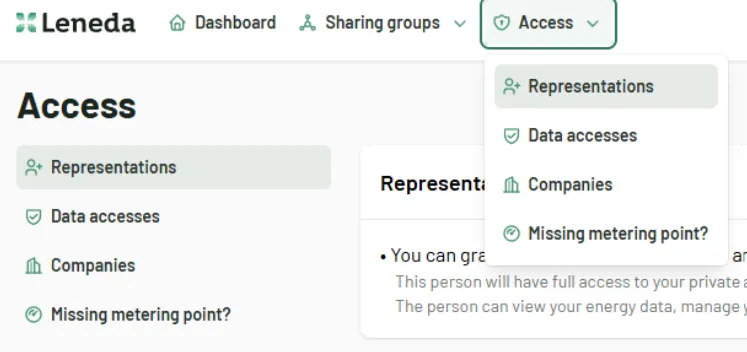
The Leneda platform offers multiple possibilities for persons and companies / organizations / administrations and ownership associations (hereinafter referred to as “companies”) to manage different types of accesses to their own or somebody else’s energy data. The functionalities are available in the “Access” part of the top menu.
Representation of a private person
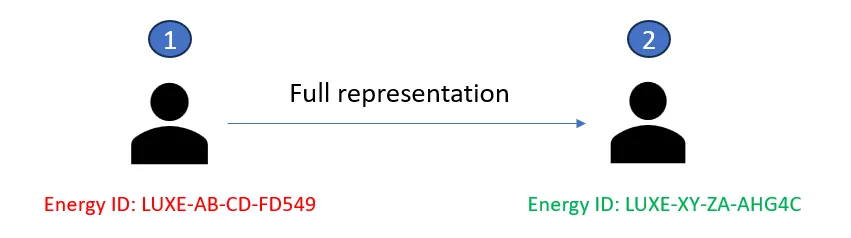
A private person can delegate his account with full rights to another person. This person will then be allowed to consult the energy data as well as to manage the energy contracts of the first person. This typically applies for family cases in which the parent delegates his account to a child. The procedure how such a representation is created in Leneda is described here.
Representations of a company / organization / administration / ownership association
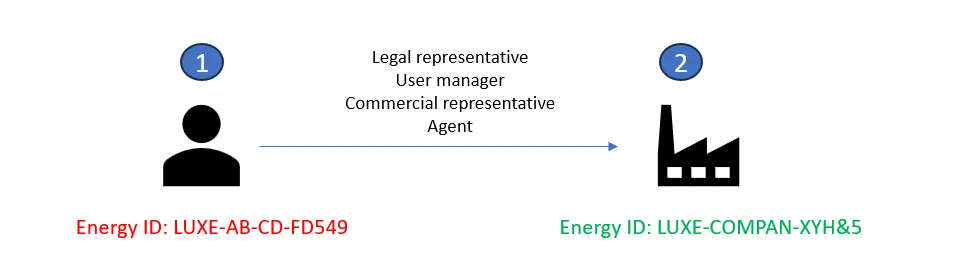
A company, being a moral person, will need to delegate some accesses to a physical person or to another company to represent the initial company. This typically applies for:
- Companies being represented by some employees
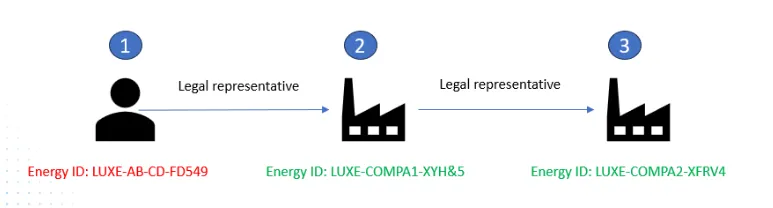
- Companies being represented by another company
- Ownership associations being represented by a property management company or a private person
Person representing a company
Company representing another company
The different roles including their functionalities that are available in Leneda are listed below:
| Role | Rights in Leneda | Source |
|---|---|---|
| Legal representative |
| RCS or other legally valid document |
| User administrator |
| Legal representative |
| Commercial representative |
| Legal representative or User administrator |
| Agent |
| Legal representative or User administrator |
The role of the legal representative is being assigned once the onboarding of the company is accepted. The legal representative has full control of the company and can assign any role to any other employee of the company.
In case of larger companies, it could make sense to designate a person, different from the legal representative, as user administrator. This person is then responsible of setting up and maintaining the user rights of the company’s employees inside Leneda.
Again, in case of larger companies, it could make sense to designate a person, different from the legal representative, as commercial representative. This person is then responsible of managing the energy contracts of the company with the energy suppliers and grid operators.
The role of agents can be assigned to employees of the company that need to have insights into the energy data.
The procedure how the roles can be assigned and managed inside Leneda is described here.
Data Access Requests
Besides these representations on full accounts between two persons or a person and a company it is as well possible to share a limited set of data with another person or another company. This applies typically for the following cases:
- Private person / company giving access to another private person / company for energy consultancy services
- Private person / company giving access to an Energy Supplier / Grid Operator to make an offer or to start a new energy contract process
The shared access can be limited to the level of the metering point giving access to all measurement data or even to specific registers. The accesses can be revoked at any moment by the user.
The simple data access requests can be realized in two ways:
- The private person / company can actively give access to another private person / company. In this case both parties will be notified about the granted accesses. The procedure how to set this up is described here.
- The private person / company can request access from another private person / company. In this case the second private person / company needs to approve the request and then both parties are notified about the granted accesses. The procedure how to set this up is described here.